Mini documentaries have become increasingly popular over the last few years. Short-form storytelling has become the tool that digital creators use to create high-impact narratives that are easy to pay attention to. These are short documentaries that summarize complicated issues into a digestible bit. As people are now consuming content across several devices and platforms, the importance of concise storytelling has become a necessity. The CapCut is a web-based video editing system that makes it easy to create movies with a documentary feel. It provides scriptwriting, scene planning, visual enhancement, and editing features, and does not require software downloads. The Story Engine platform also gives creators greater power by converting simple concepts into formatted, cinematic mini documentaries. This allows high-quality production to be available to the novice as well as the seasoned storyteller.

Introduction to Mini Documentary Storytelling in the Age of AI
Mini documentaries have various uses. They inform, create awareness and present complex topics in captivating stories to viewers. Short formats require brief writing and conscious rhythm to be clear. AI aids the creators by organizing the storylines, timing the scenes, and ensuring the visual unity of the project. Another useful use of AI is in researching content and coming up with visual references, which save time during preparation. The cloud-based environment of CapCut is especially beneficial in the case of iterative storytelling. You are able to create, update and polish storyboards and access limitless media properties. It can be integrated with research-intensive documentaries without local storage or software installation. It enables the creators to concentrate more on storytelling rather than technical obstacles.
Finding the Story Engine in CapCut
The CapCut Story Engine is a script-to-cinema automatic translator. It decodes the narrative features and produces scene-by-scene deconstructions of the facts of storytelling. It is particularly useful when the subject matter is historical, scientific or real-life and accuracy is required. AI storyboard generation visually renders the script prior to production, which helps provide unity between scenes. You are able to easily determine gaps or pacing problems and make corrections at an early stage. Scene templates give visual consistency, and AI-assisted recommendations optimize transitions and pacing. The Story Engine of CapCut makes sure that even the creators with little to no editing knowledge can create a mini documentary that may look professional. It strikes a balance between automation and human control, allowing the creators to maintain their personal tone and use the efficiency of AI.
Writing an effective AI Documentary Script
A good storyline is vital in mini-documentaries. Begin with a hook to capture the attention of viewers, create context, tension, and a logical resolution of the story. The narration must be appropriate to the topic- objective when dealing with facts, investigative when dealing with mysteries, and reflective when dealing with personal stories. Using AI video maker tools, raw ideas can be transformed into structured scripts with scene suggestions. This process aids in keeping the clarity, right pacing, and visualizing important information. Such tools as CapCut help to arrange the content logically; thus, transitions are smooth, and the narrative flow is coherent. With intelligent scripting and AI-based scene planning, creators may create very engaging mini documentaries.
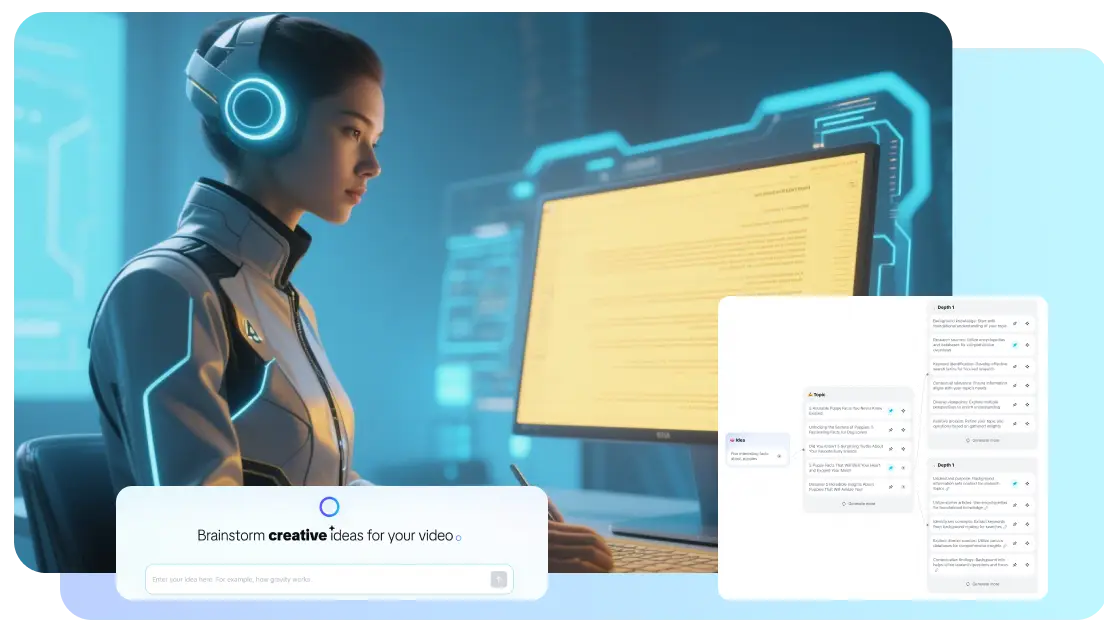
Steps to Create Mini Documentaries using the AI Video Maker Story Engine
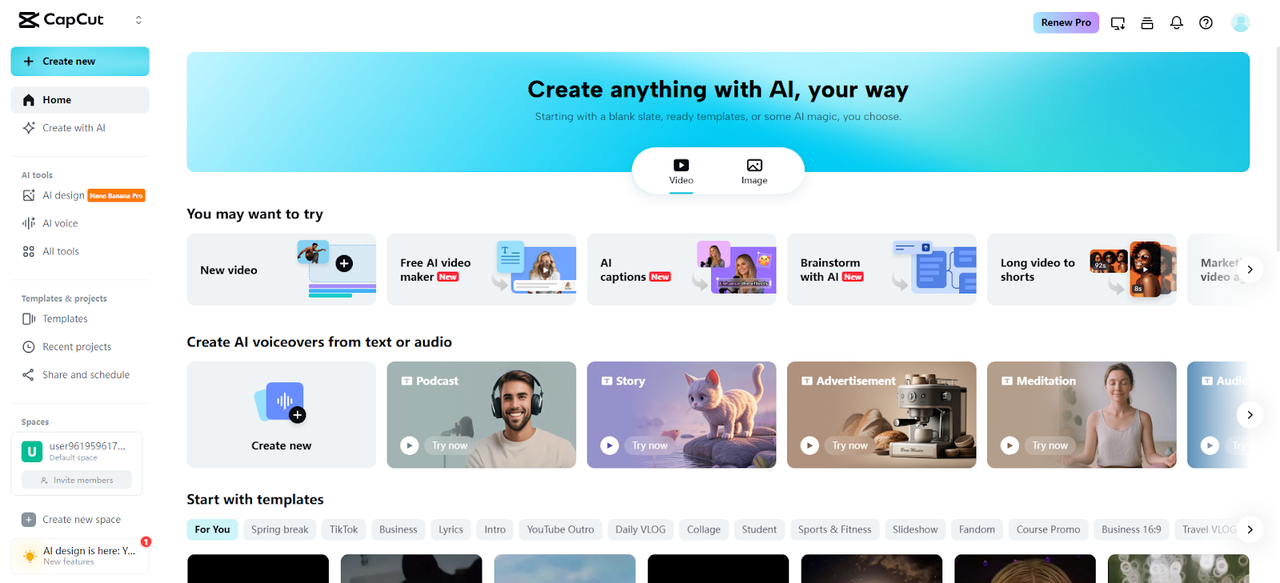
Step 1: Launch the Story Engine Workspace.
Start by opening CapCut through your browser. Move to the main dashboard and locate the “Free AI video maker” option to unlock all automated video tools. From the available options, select “Instant AI video” to begin shaping your mini documentary with AI-powered assistance.
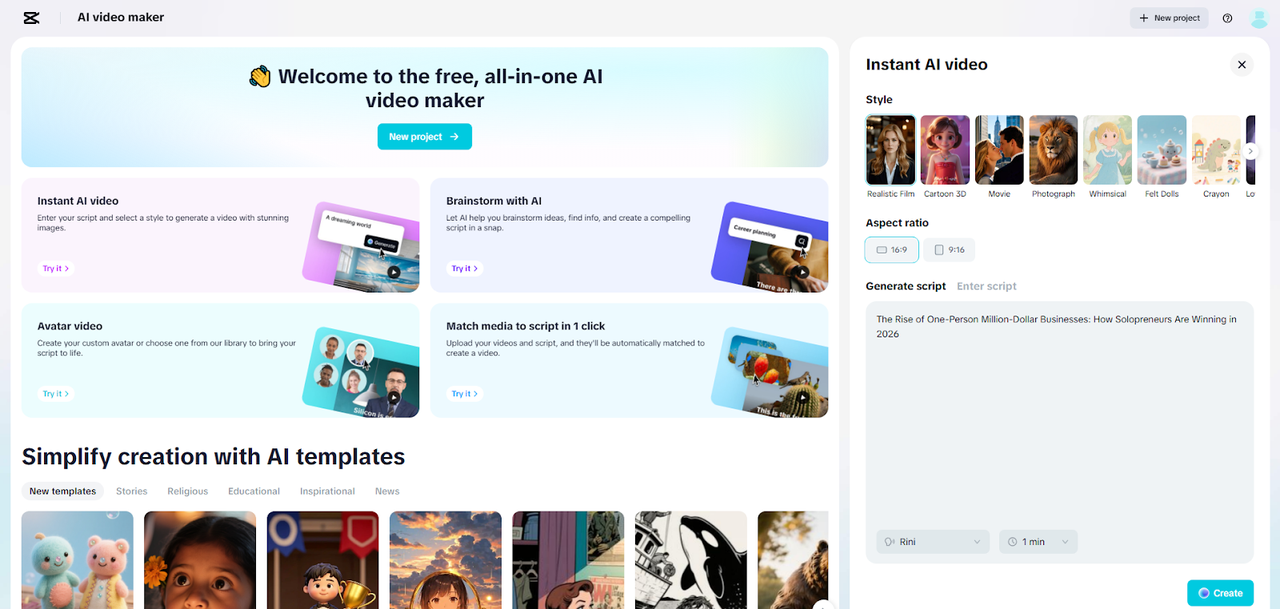
Step 2: Shape the Documentary Narrative
Select a visual tone that suits your documentary theme. Add your concept inside the “Enter script” box or use “Generate script” to let the AI transform your idea into a clean storyboard outline. Choose an aspect ratio such as 16:9 for standard viewing or 9:16 for vertical formats. Define the storyboard length and set the narration style or tone. Press “Create” to produce a structured scene-by-scene storyboard with visual guidance.
Step 3: Finalize the Documentary and Export
Once the storyboard appears, click “Create” again to generate the full visual sequence with cues. Open the “Music” panel to add a suitable background score from CapCut’s built-in library. Visit “Elements” to select a caption template that balances your documentary tone.
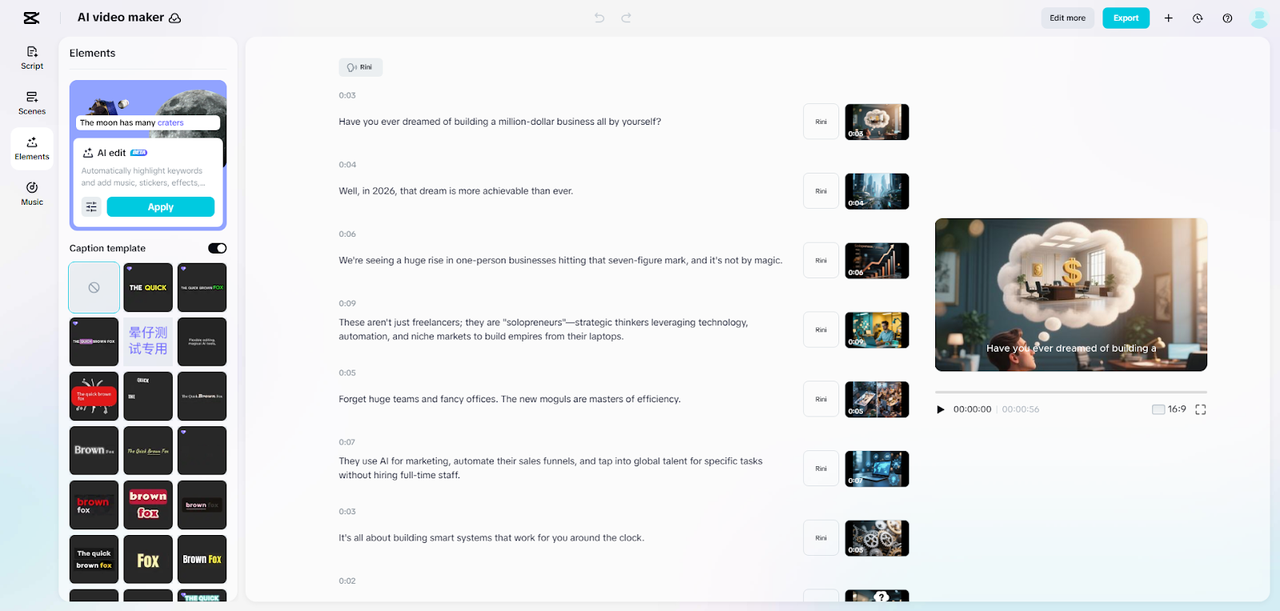
After completing all edits, hit “Export” to choose the resolution, format, and frame rate. Press “Export” once more to download the finished mini documentary.

Improving Documentary Visuals through CapCut Tools
Illustrations are very important in mini-documentaries. AI avatars can be used to give educational explanations without the need for on-camera presence. The media content library offers maps, diagrams, and background images that enhance narrations. It is enhanced by motion graphics, caption,s and archival-like overlay to provide depth and professionalism. The visual tools of CapCut allow creating refined content in a short period of time. The inclusion of such aspects increases the level of understanding, interest, and aesthetics. Having the capability to seamlessly blend various types of media, creators are able to create visually rich mini documentaries that are effective communicators.
Ai-Powered Story Flow Mini Documentaries
CapCut automates the transition of scenes and pacing themes to keep the viewer interested. The site treats narrative consistency by implying visual clues that highlight important information. The length of scenes is easily adjustable to maintain attention and avoid fatigue in the viewer. Manual editing takes less time than AI-powered story flow which enhances overall coherence. The cloud-based workspace of the platform facilitates teamwork, thus facilitating the ease of refining it through iteration. Using AI to structure the story flow allows the creators to concentrate on content accuracy and creativity and leave technical sequencing to the system.
Small-Tuning Narration, Music, and Ambiance
Emotional impact requires music, voiceovers, and sound design. CapCut offers a large variety of documentary-suitable tunes of all moods. The use of AI voiceovers guarantees consistency in narration, even in a variety of scenes. Sound design can raise the tension, immersion, or emotional appeal. The careful integration of these aspects enhances the experience of the entire documentary. As an illustration, background music that is soft and gentle when reflecting or when they are actually presenting information is successful in mood-setting. The synchronization of visuals and audio with AI assistance makes the visuals more interesting to the viewer.
Exporting and Optimization of Mini Documentaries to Multiple Platforms
The distribution needs platform specifics. The right aspect ratio means that your video will fit on YouTube, TikTok, or Instagram Reels. Optimization of titles, captions and metadata is necessary to enhance visibility. The cloud workspace of CapCut enables two or more collaborators to perfect projects in real time. This simplifies production through multi-platform. Moreover, the use of branded content or overlay would provide uniformity across channels. Mini documentaries are aesthetically viable and informative with the right optimization. Tools like the Nano Banana Pro media library offer additional creative assets to enhance visual storytelling.

Conclusion
The Story Engine of CapCut enables creators to create significant mini-documentaries within a short time. With the help of AI-assisted scripting, automated scene generation, and high-end visual tools, even novices can produce refined content. It makes research, structuring, and editing of narratives simpler, enabling creators to concentrate on the impact of the story instead of technical issues. The discovery of CapCut as a complete production system brings about new possibilities to storytellers who want to make high quality mini documentaries that are produced in an efficient way. It is user-friendly and browser-based, which allows anyone to create a professional video.

