In today’s digital world, almost everything we do depends on technology. From banking and shopping to chatting with friends, our devices are always connected. But this convenience also comes with risks. One of the biggest threats is malware. Many people have heard the term, but very few truly understand how it works behind the scenes.
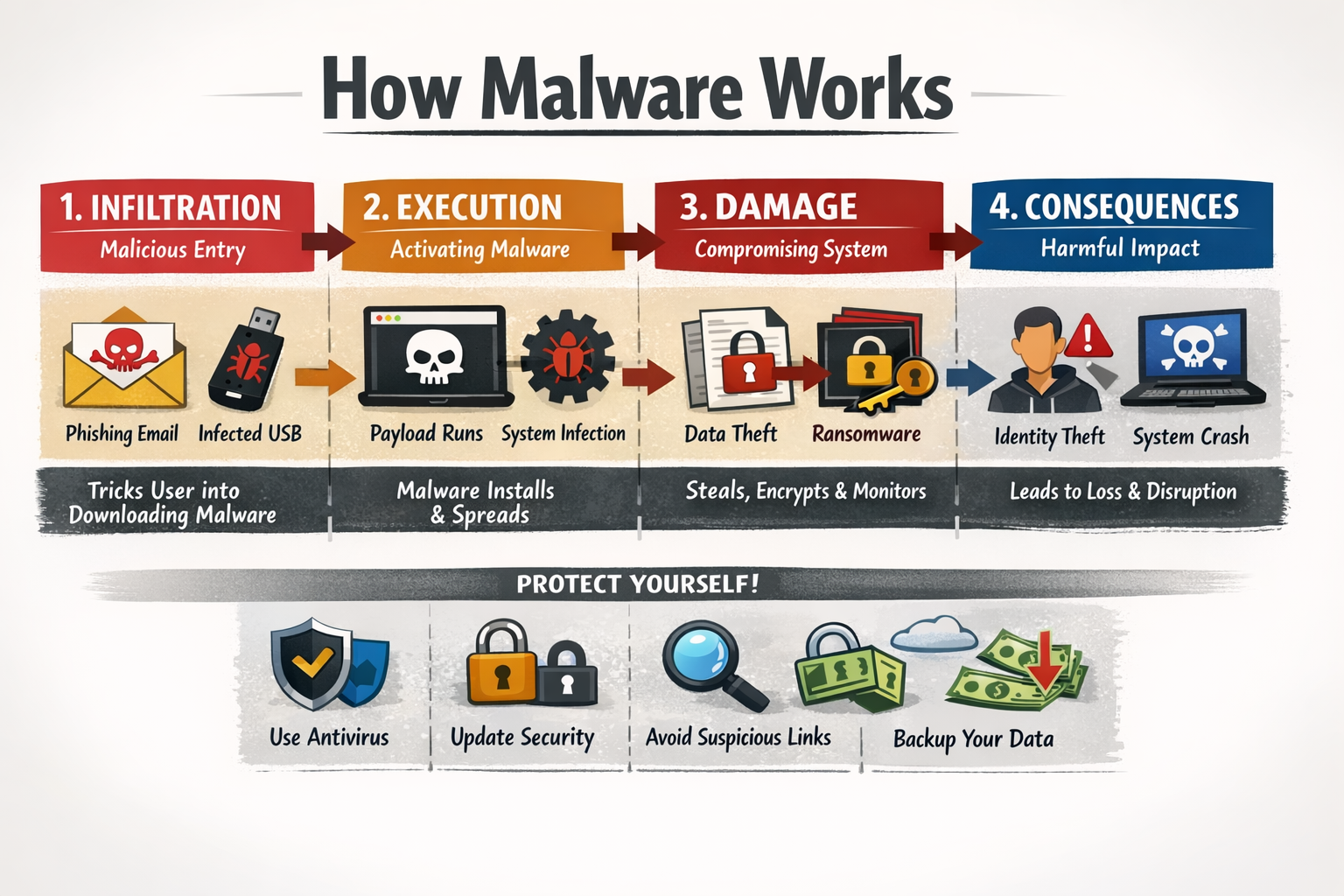
This article will break it down in a simple and human way so you can understand not just what malware is, but how it actually operates once it gets inside a system.
What is Malware?
Malware is short for malicious software. It is any program or code designed to harm, exploit, or gain unauthorized access to a computer, network, or device. It is created by cybercriminals for different purposes. Some want money. Some want data. Others want control over systems.
Common types of malware include:
- Viruses
- Worms
- Trojans
- Ransomware
- Spyware
- Adware
Each type behaves differently, but they all follow a similar basic process once they infect a system.
Step 1: How Malware Enters Your Device
Before malware can do anything, it needs to get inside your system. This is called the infection stage. Most malware does not just magically appear. It relies on tricks and weaknesses.
Common infection methods:
1. Phishing emails
You receive an email that looks real, maybe from a bank or a company. It asks you to click a link or download a file. That file contains malware.
2. Fake downloads
Free software, cracked apps, or fake updates often carry hidden malicious code.
3. Malicious websites
Some websites automatically download malware when you visit them. This is called a drive by download.
4. USB devices
Infected USB drives can spread malware when plugged into a computer.
5. Software vulnerabilities
Outdated software can have security holes. Malware uses these gaps to enter without your knowledge.
Once inside, the real process begins.
Step 2: Installation and Execution
After entering your device, malware needs to install itself and start running.
This step is usually silent. You will not see anything obvious happening.
What happens during installation?
- The malware copies itself into system folders
- It may rename itself to look like a normal file
- It modifies system settings to ensure it runs automatically
Many malware programs try to gain higher privileges, meaning they want administrator access. This allows them to control more parts of your system.
Some advanced malware uses techniques to avoid detection during installation, such as:
- Disabling antivirus software
- Hiding files from the system
- Encrypting its own code
Step 3: Persistence
Once installed, malware wants to stay on your system for as long as possible. This is called persistence. Even if you restart your device, the malware should still be there.
How malware achieves persistence:
- Adding itself to startup programs
- Modifying system registry settings
- Creating scheduled tasks
- Injecting itself into legitimate processes
This ensures that even if you close an infected program, the malware continues running in the background.
Step 4: Communication with the Attacker
Most modern malware does not work alone. It communicates with a remote server controlled by the attacker. This is often called a command and control server.
Once connected, the malware can:
- Receive instructions
- Send stolen data
- Update itself
- Download more malicious tools
This communication usually happens silently in the background using the internet.
Some malware uses encryption to hide its communication, making it harder for security systems to detect.
Step 5: Payload Execution
This is where the real damage begins. The payload is the main purpose of the malware.
Different malware types have different payloads.
Examples of malware payloads:
1. Data theft
Stealing passwords, credit card details, or personal information.
2. Ransomware attacks
Encrypting your files and demanding payment to unlock them.
3. Spyware activity
Monitoring your activity, recording keystrokes, or capturing screenshots.
4. Botnet creation
Turning your device into part of a network used for attacks like DDoS.
5. Ad fraud
Displaying unwanted ads or generating fake clicks.
The payload can be immediate or delayed. Some malware waits for the right moment before acting.
Step 6: Spreading to Other Systems
Some malware is designed to spread. This increases its impact.
How malware spreads:
- Sending infected emails to your contacts
- Exploiting network vulnerabilities
- Copying itself to shared drives
- Using removable devices
Worms are especially known for spreading quickly without user interaction.
How Malware Hides Itself
One of the most dangerous things about malware is how well it can hide.
Cybercriminals design malware to avoid detection for as long as possible.
Common hiding techniques:
1. Obfuscation
The code is scrambled to make it difficult to analyze.
2. Polymorphism
The malware changes its code each time it spreads, making it harder to detect.
3. Rootkits
These hide malware deep within the operating system.
4. Fileless malware
Instead of installing files, it runs in memory, making it very hard to detect.
Because of these techniques, many users do not realize they are infected until serious damage is done.
Signs Your Device Might Be Infected
Even though malware tries to stay hidden, there are some warning signs.
- Your device becomes slow
- Unexpected pop up ads appear
- Programs crash frequently
- Unknown software is installed
- Internet usage increases without reason
- Files are missing or encrypted
If you notice these signs, it is important to act quickly.
Why Malware is So Dangerous
Malware is not just about annoying ads or slow computers. It can have serious consequences.
Real risks include:
- Financial loss
- Identity theft
- Loss of important data
- Damage to business operations
- Privacy invasion
For businesses, a malware attack can lead to huge losses and damage to reputation.
How to Protect Yourself from Malware
Understanding how malware works is the first step. The next step is prevention.
Simple protection tips:
1. Keep software updated
Updates fix security vulnerabilities.
2. Avoid suspicious links and downloads
Do not trust unknown emails or websites.
3. Use strong passwords
This reduces the risk of unauthorized access.
4. Install reliable security software
Antivirus programs can detect and remove threats.
5. Backup your data regularly
This protects you from data loss in case of ransomware.
6. Be cautious with public WiFi
Unsecured networks can expose your data.
The Human Factor in Malware Attacks
One important thing to understand is that malware often depends on human behavior.
Cybercriminals take advantage of curiosity, fear, or urgency.
For example:
- A fake message saying your account is locked
- A tempting offer that seems too good to be true
- A warning that pushes you to act quickly
In many cases, people unknowingly allow malware into their systems.
Being aware and thinking twice before clicking can prevent many attacks.
Final Thoughts
Malware is not just a technical issue. It is a combination of technology and psychology. It enters through small mistakes, hides quietly, and then causes damage when you least expect it. The way malware works can seem complex, but the process follows a clear path: It enters your device, installs itself, stays hidden, communicates with attackers, and finally carries out its harmful actions. By understanding this process, you become more aware and better prepared to protect yourself. In a world where digital threats are constantly evolving, staying informed is your strongest defense.

