Have you ever wondered how data travels across the internet or between different networks? How does your message reach your friend’s phone, or your video call connect to someone sitting halfway across the world? The answer lies in something called a routing table.
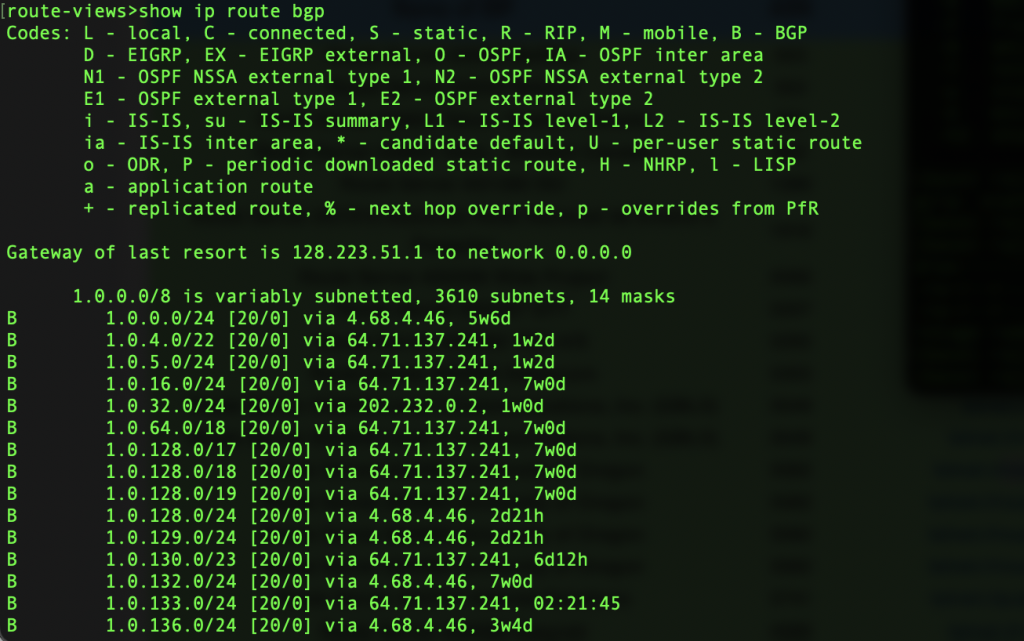
Routing tables are the heart of how data finds its way through the complex web of devices and connections that make up the internet. While it might sound technical, the concept is actually quite simple when explained in everyday language. In this article, we’ll break down what a routing table is, how it works, and why it’s important — all in a clear and human-friendly way.
Understanding the Basics: What Is a Routing Table?
At its core, a routing table is a set of rules or instructions used by network devices—like routers and computers—to determine the best path for sending data packets from one place to another.
Imagine you’re sending a letter. You write the recipient’s address on the envelope, and the postal system figures out the best way to deliver it. Similarly, in a computer network, when data needs to travel from your device to another device (like a server or a friend’s computer), the routing table helps figure out the best path to take.
Each entry in a routing table contains information about a specific destination and how to get there. It’s like having a digital map that shows which direction to go based on where the data needs to end up.
Why Do Routing Tables Matter?
Routing tables are crucial for the internet and all types of computer networks to function properly. Without them, data wouldn’t know where to go, and communication between devices would fail.
Here’s why routing tables are important:
-
✅ They ensure efficient data delivery.
-
✅ They help avoid network congestion.
-
✅ They allow data to take backup routes if a main route is unavailable.
-
✅ They help routers make fast, automatic decisions.
In other words, a routing table is like a GPS for your data.
What’s Inside a Routing Table?
Now that you know what a routing table does, let’s look at what it actually contains. A typical routing table has several fields. Here are the most common ones:
1. Destination
This is the address of the network or device the data is trying to reach. It could be an IP address or a network ID.
2. Subnet Mask
The subnet mask helps identify which part of the destination IP address refers to the network and which part refers to the host.
3. Next Hop
This tells the router where to send the data next. It’s often the IP address of another router on the way to the final destination.
4. Interface
The interface refers to the router’s port or connection that should be used to forward the data.
5. Metric
A metric is like a score that helps the router decide which route is best. Lower metrics usually mean faster or more reliable paths.
Types of Routing Tables
There are generally two types of routing tables:
1. Static Routing Tables
These are manually configured by a network administrator. Once they’re set, they don’t change unless the admin updates them.
-
✅ Pros: Easy to control and predictable.
-
❌ Cons: Not flexible and doesn’t adapt to changes automatically.
2. Dynamic Routing Tables
These are updated automatically using special routing protocols like OSPF, BGP, or RIP. Routers talk to each other and share information about the best routes.
-
✅ Pros: More flexible and adaptive.
-
❌ Cons: Slightly more complex and can use more resources.
Real-Life Analogy: How Routing Tables Work
Let’s say you’re driving from your home to a friend’s house across town. You open your map app, and it shows you multiple routes based on traffic, distance, and speed. You pick the one that gets you there fastest.
In the digital world, routers do the same thing. They look at their routing table and choose the best path to deliver your data. If there’s a roadblock (like a downed server), they pick a different route automatically (if dynamic routing is used).
How Routing Tables Are Built
Routing tables can be created in several ways:
-
Manual entry by a network admin (for static routes)
-
Automatically through routing protocols (for dynamic routes)
-
Learned from directly connected networks
For example, when you set up a home Wi-Fi router, it usually learns about your internet service provider’s gateway automatically and adds it to the routing table.
Common Routing Protocols
If dynamic routing is being used, routers communicate using special languages known as routing protocols. Here are a few popular ones:
-
RIP (Routing Information Protocol): One of the oldest protocols, used for small networks.
-
OSPF (Open Shortest Path First): Faster and more efficient, used in larger enterprise networks.
-
BGP (Border Gateway Protocol): Used to connect different internet service providers and large-scale networks—basically how the internet itself works!
These protocols constantly update routing tables so that data can flow smoothly and efficiently.
Viewing a Routing Table
You can actually view the routing table on your own computer. If you’re using Windows, just open Command Prompt and type:
On macOS or Linux, open the Terminal and type:
You’ll see a list of destinations, gateways, and interfaces. While it might look technical, it’s basically the list of routes your system knows about.
Final Thoughts: Why You Should Care
Even if you’re not a network engineer, understanding routing tables can be useful—especially if you work in IT, cybersecurity, or run your own website. They play a silent but essential role in making sure your emails, video calls, and web browsing happen without a hitch.
To sum it up:
-
A routing table is like a digital roadmap.
-
It helps routers decide where to send data.
-
It can be static (manual) or dynamic (automatic).
-
It’s essential for efficient and reliable communication across the internet.
Routing tables might be behind the scenes, but without them, the internet wouldn’t work the way we know it. So the next time you load a website or send a message, remember: it’s the routing table doing a lot of the heavy lifting.


me quiero unirme asu grupo